Video acquistabili.Visualizzazioni illimitate.
Klipo porta nel tuo negozio Shopify i video verticali di Instagram, TikTok e i tuoi caricamenti, ci collega i prodotti del catalogo e li pubblica in widget pronti. Chi guarda sceglie la variante e aggiunge al carrello senza uscire dal video.
0$
Piano Free: 15 video, 1 widget
∞
Visualizzazioni, su ogni piano
8
Tipi di widget per il tuo tema
7
Giorni di prova sui piani a pagamento
01
Una libreria per tutti i tuoi video
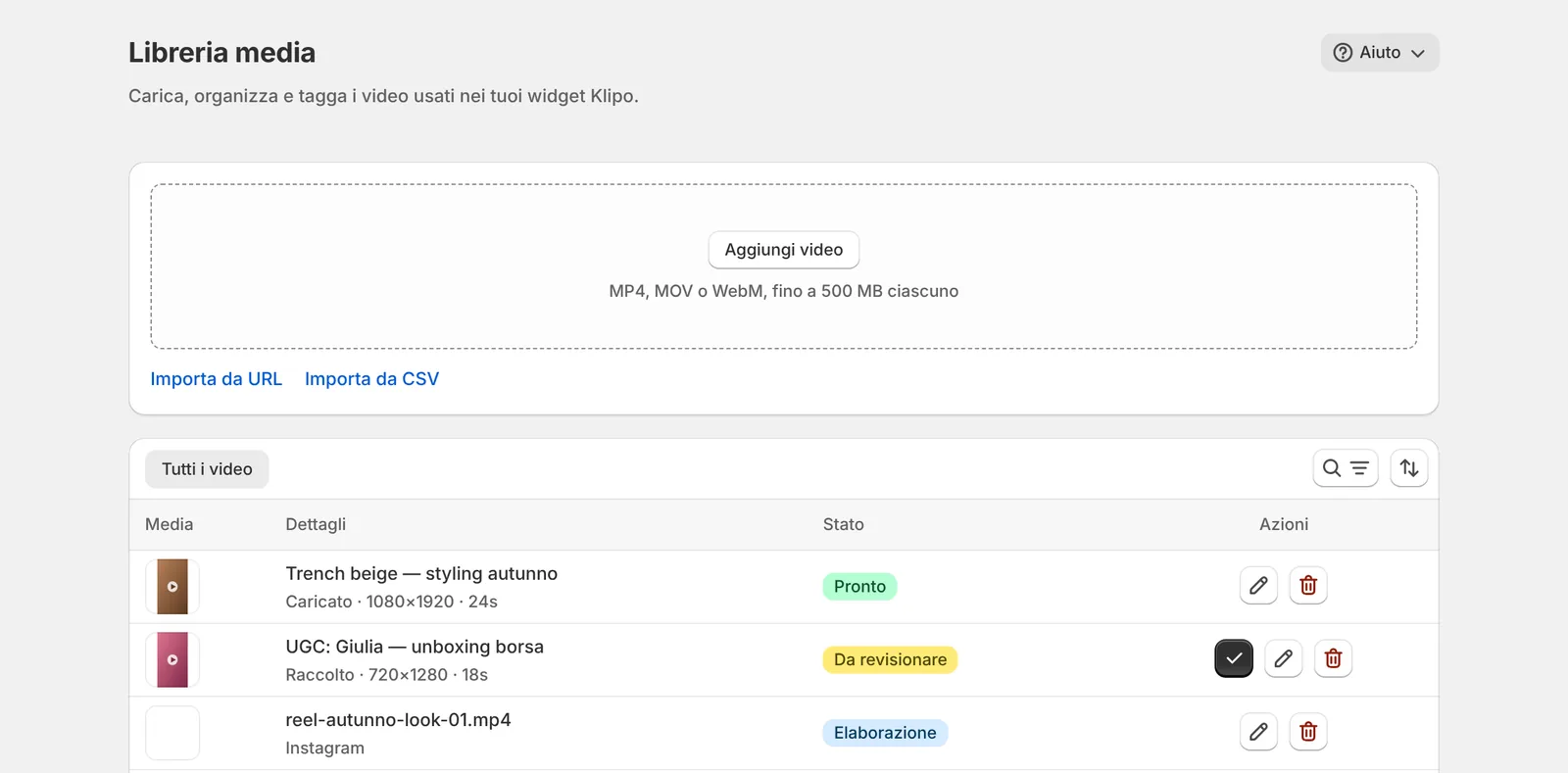
Carichi file MP4, MOV o WebM fino a 500 MB e 10 minuti, importi da un link diretto al file o da un CSV fino a 500 righe. Ogni video passa da solo per In coda, Elaborazione e Pronto; se qualcosa va storto vedi il motivo e, quando ha senso, il pulsante Riprova.
02
Instagram e TikTok, senza login
Inserisci l'handle di un profilo pubblico: Klipo importa i video già pubblicati e ricontrolla il profilo una volta al giorno, con «Sincronizza ora» quando non vuoi aspettare. I post foto di TikTok diventano uno slideshow video. Niente password, niente OAuth.
03
I video dei tuoi clienti
Condividi un link pubblico di raccolta UGC: clienti e creator caricano il loro video, fino a 90 MB, con nome, email e dichiarazione sui diritti. I contributi arrivano in Libreria come «Da revisionare» e vanno in vetrina solo dopo la tua approvazione.
04
Otto tipi di widget
Carousel, Spotlight, Stories, Griglia, Hero, Popup, Video prodotto smart e Collezione, con template di partenza e anteprima live. Il targeting limita il widget a tutte le pagine, a prodotti, collezioni o URL specifici; la programmazione decide da quando a quando è visibile.
05
Si compra dentro il video
Un tocco sulla tile apre il player a schermo intero, in stile Reels: scheda prodotto con prezzo e varianti live, acquisto ricorrente quando il prodotto lo prevede, fino a quattro prodotti consigliati e aggiunta al carrello vero del negozio, senza ricaricare la pagina.
06
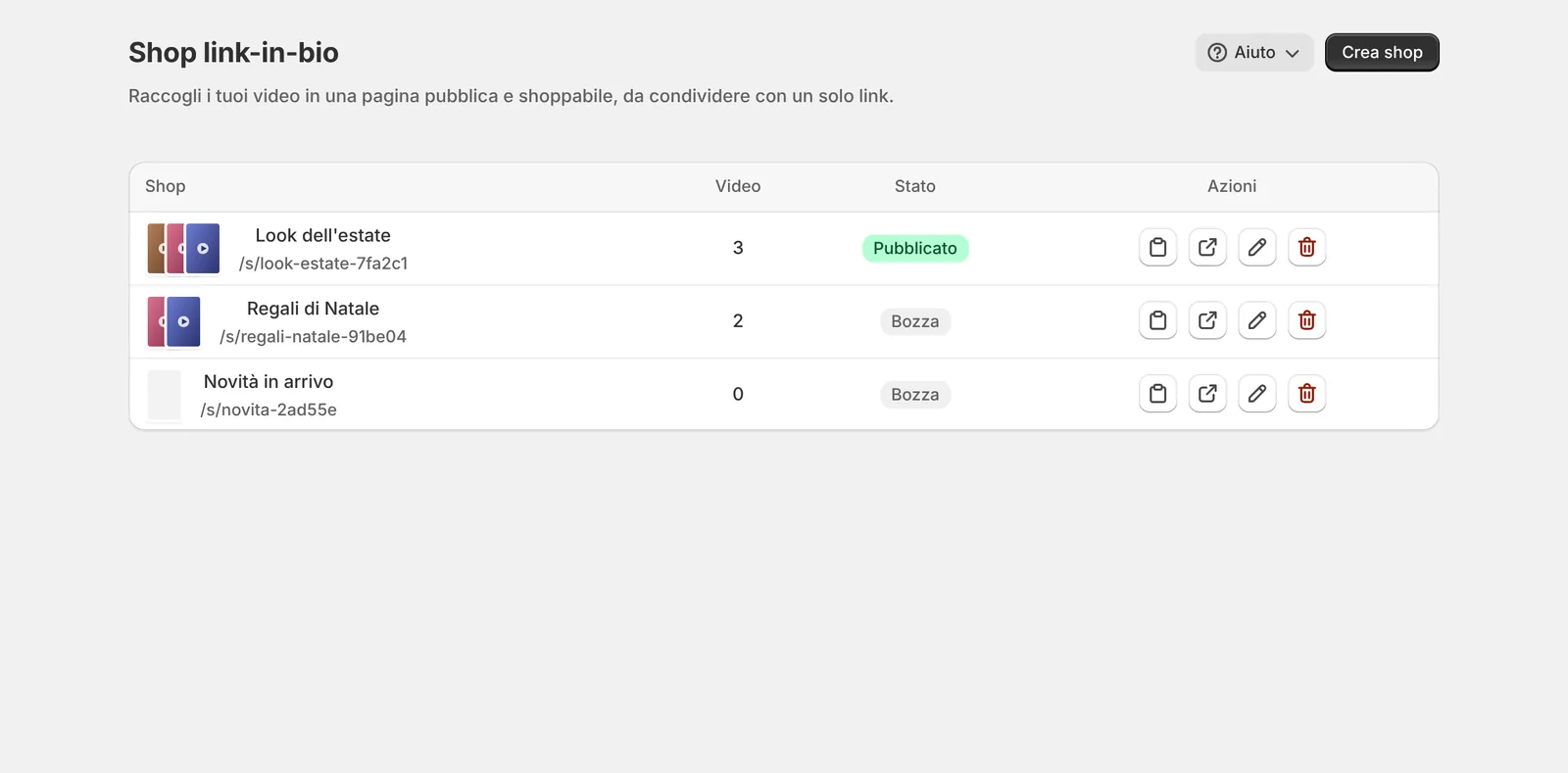
Shop link-in-bio
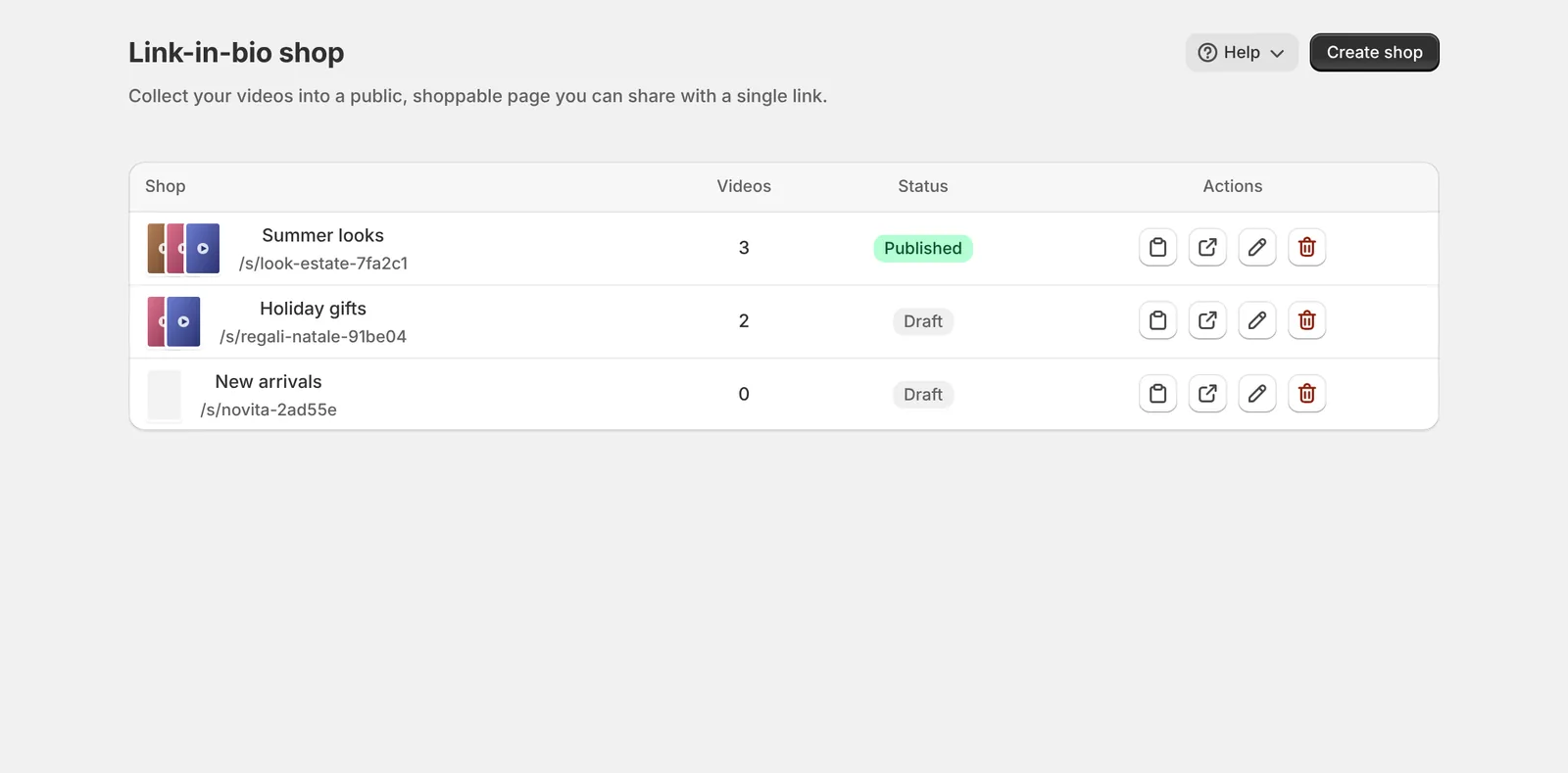
Una pagina pubblica e acquistabile con i video che scegli, su klipo.wavo.it/s/…, da mettere nella bio di Instagram o TikTok. È generata lato server con i dati strutturati VideoObject e Product, quindi è leggibile anche dai motori di ricerca.
07
Analytics e ricavi attribuiti
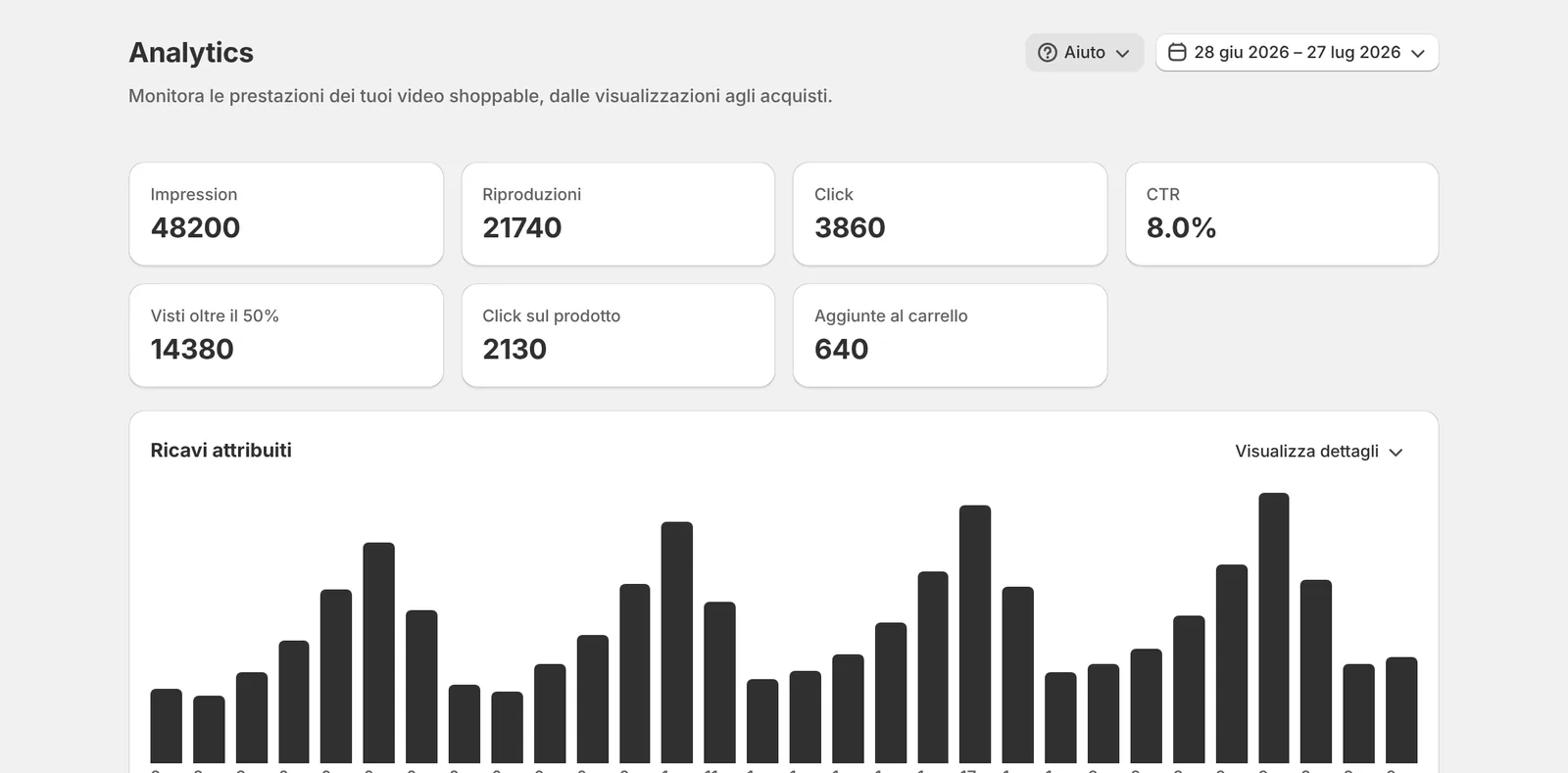
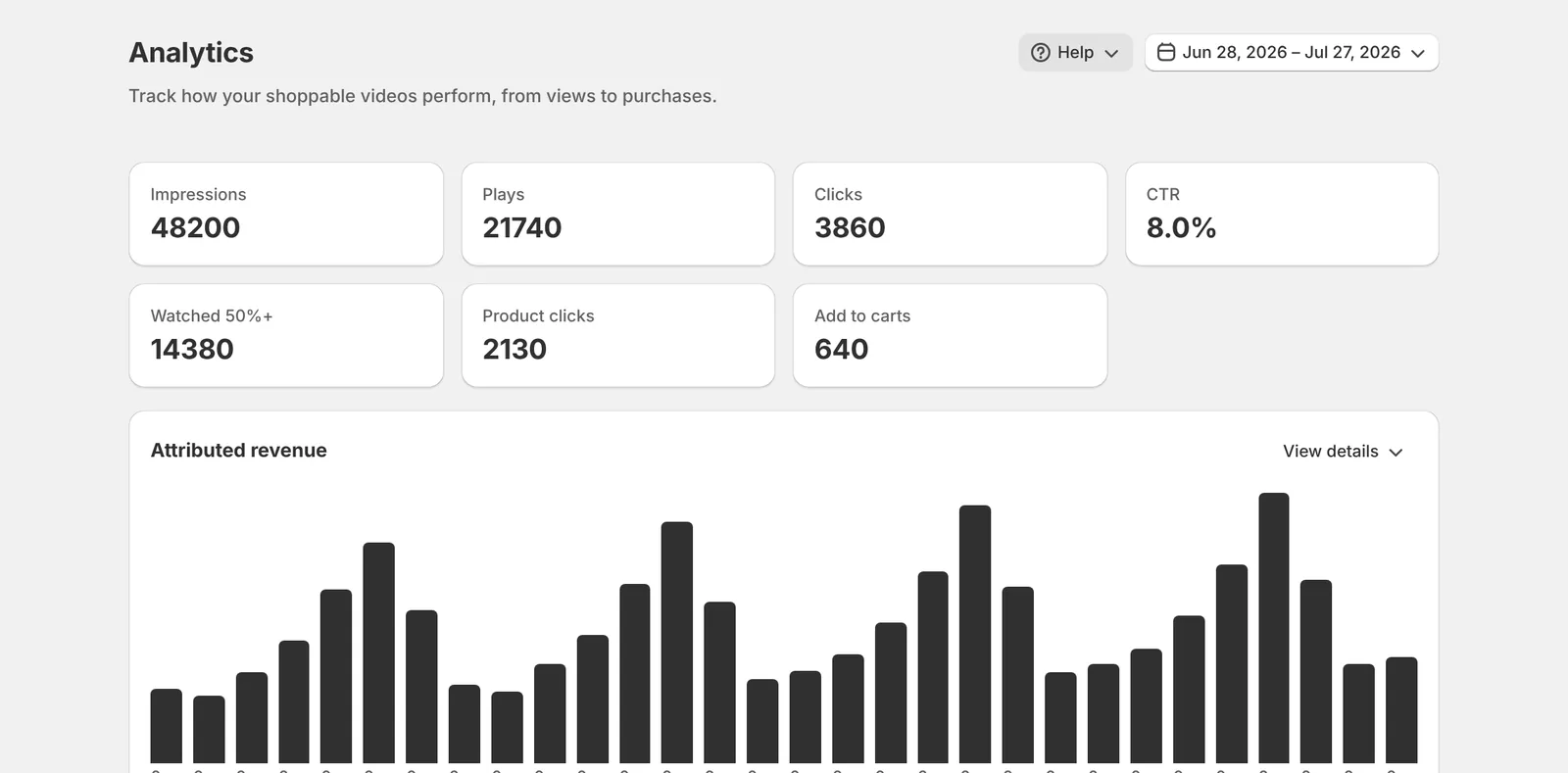
Impression, riproduzioni, click, visti oltre il 50%, click sul prodotto e aggiunte al carrello, più i ricavi attribuiti divisi in diretti, view-through e non attribuiti. Il valore degli ordini viene letto da Shopify, mai dal browser. Incluse in ogni piano.
08
Leggero sul tuo tema
Klipo entra con una theme app extension, senza modificare i file del tema: un solo script sotto i 19 KB dalla CDN di Shopify, il widget isolato in uno Shadow DOM e il player in un iframe. «Installa nel tema» apre l'editor con il blocco già al posto giusto.
Dal primo video al primo widget in circa un quarto d'ora
Più il tempo che serve a elaborare i video. Nella Panoramica la checklist «Completa la configurazione» ti accompagna passo per passo.
01
Installa
Da Shopify App Store, accettando i permessi. Parti dal piano Free e atterri nella Panoramica, dentro l'admin Shopify.
02
Porta i video
Collega un profilo Instagram o TikTok, carica i file o importali da URL e CSV. L'elaborazione è automatica.
03
Tagga i prodotti
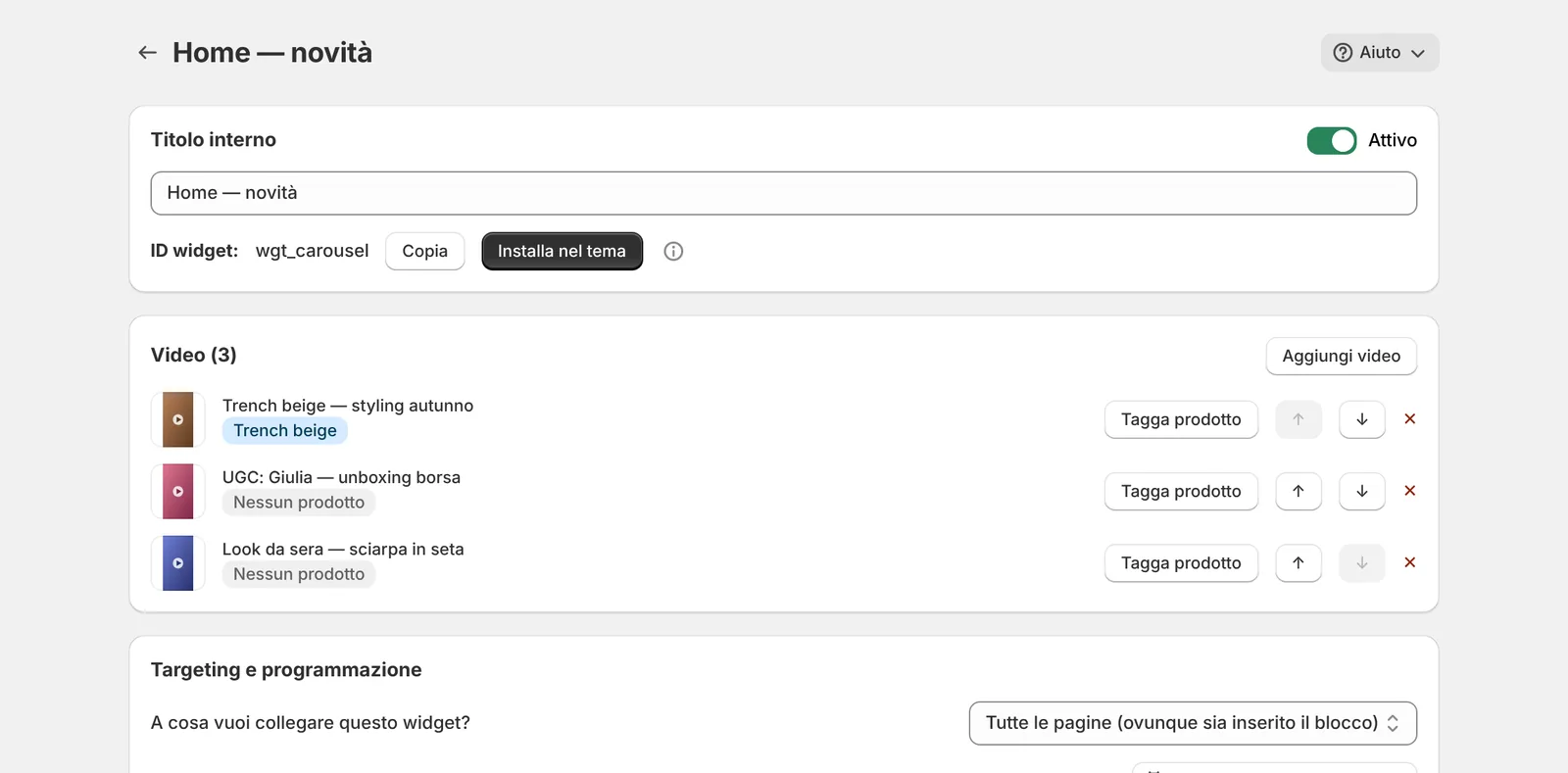
Nella scheda del video, «Aggiungi prodotto» collega il catalogo: è il passo che rende il video acquistabile.
04
Pubblica il widget
Scegli tipo e template, attivalo e premi «Installa nel tema»: si apre l'editor del tema, posizioni il blocco e salvi.
Lo stato del negozio in una schermata
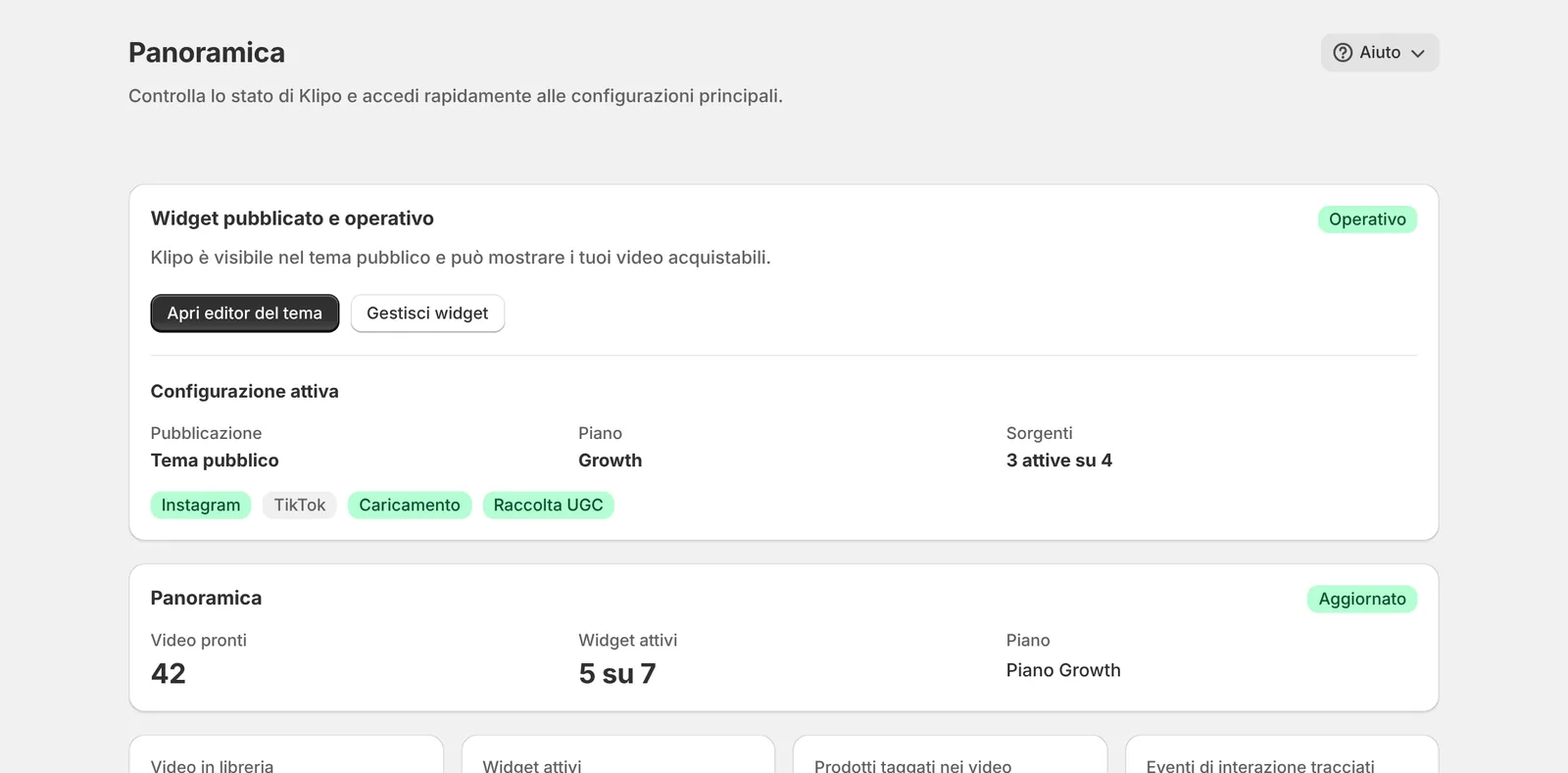
La Panoramica ti dice se il widget è pubblicato e operativo nel tema, quale piano usi, quali sorgenti di video sono attive e quanti video e widget hai. Tutto dentro l'admin Shopify.
Prezzo fisso. Le visualizzazioni non si contano.
Si parte dal piano Free. Le uniche cose contate sono i video conservati in libreria e i widget attivi: le visualizzazioni sono illimitate su ogni piano. Gli abbonamenti sono addebitati da Shopify ogni 30 giorni, sulla normale fattura del negozio, e i piani a pagamento hanno 7 giorni di prova.
Scendendo di piano non viene cancellato nulla: per 30 giorni Klipo ti tiene i posti dei widget che avevi attivi.
Free
$0
- 15 video in libreria
- 1 widget attivo
- Visualizzazioni illimitate
- Analytics e ricavi attribuiti
Starter
$15/30 giorni
- 100 video in libreria
- 5 widget attivi
- Visualizzazioni illimitate
- 7 giorni di prova
Growth
$45/30 giorni
- Video e widget illimitati
- Esportazione CSV dei dati
- Visualizzazioni illimitate
- 7 giorni di prova
Scale
$179/30 giorni
- Tutto il piano Growth
- API pubblica e webhook in uscita
- Libreria condivisa tra più negozi
- 7 giorni di prova
Prezzi in dollari USA. Fa fede l'importo mostrato sulla pagina prezzi di Shopify al momento della scelta del piano.
Le risposte che diamo più spesso
Quanto pago se un video fa 100.000 visualizzazioni?
Nulla in più. Le visualizzazioni sono illimitate su tutti i piani, Free compreso: si paga solo per quanti video conservi in libreria e quanti widget tieni attivi.
Posso importare un Reel incollando il link?
No: il link a una pagina Instagram o TikTok non è un file video. Si collega l'handle del profilo dalla pagina Account e Klipo importa da solo. «Importa da URL» accetta solo link diretti a file .mp4, .mov o .webm.
Serve il login a Instagram o TikTok?
No. Basta l'handle di un profilo pubblico e la conferma di avere i diritti sui contenuti. I profili privati non si possono importare; se un profilo diventa privato la sincronizzazione si mette in pausa.
Quanto ci mettono ad arrivare i nuovi post?
Il primo import parte subito. Poi Klipo ricontrolla il profilo una volta al giorno, quindi un post nuovo può metterci fino a 24 ore. «Sincronizza ora» lo porta subito, al massimo una volta al minuto.
Ho creato il widget ma sul negozio non si vede.
Servono due cose: il widget attivo in Klipo con almeno un video pronto, e il blocco Klipo aggiunto e salvato nel tema pubblicato. «Installa nel tema» apre l'editor del tema con il blocco già inserito; la Panoramica ti dice quando è tutto operativo.
Posso mettere i video nelle pagine prodotto o collezione?
Sì. Ci sono tipi di widget dedicati, Video prodotto smart e Collezione, e il blocco Klipo si aggiunge a qualunque template. Il targeting limita un widget a prodotti, collezioni o URL specifici.
Il cliente deve uscire dal video per comprare?
No. Dal player sceglie la variante e aggiunge al carrello del tuo negozio senza ricaricare la pagina; il checkout resta quello di Shopify.
Da dove arrivano i ricavi attribuiti?
Dagli ordini reali del negozio: il Web Pixel di Shopify segnala il checkout e Klipo rilegge il valore dell'ordine dall'Admin API, invece di fidarsi del browser. I ricavi sono separati in diretti, view-through e non attribuiti, mai mescolati.
Klipo raccoglie dati personali dei miei clienti?
No. Klipo non chiede il permesso read_customers e le analytics usano un identificatore casuale, mai collegato a nome o email. L'unica eccezione è il link di raccolta UGC, dove chi invia un video lascia nome ed email come traccia dei diritti; una richiesta di cancellazione li rimuove.
Cosa succede se scendo di piano o disinstallo?
Scendendo di piano non si spegne e non si cancella nulla, e per 30 giorni tieni i posti dei widget attivi. Disinstallando, i dati restano per circa 48 ore, finché Shopify non chiede la cancellazione del negozio: se reinstalli prima, ritrovi tutto.
Ti rispondiamo noi, che l'app l'abbiamo scritta
Import da Instagram e TikTok, installazione del blocco nel tema, targeting dei widget, lettura delle analytics, piani e limiti. Dentro l'app, il menu Aiuto di molte pagine offre anche un tour guidato e una guida illustrata.
Non inviare password, token API, dati di pagamento o dati personali dei clienti nei messaggi di supporto.
Live chat
Il software di chat Wavo viene caricato solo dopo che premi il pulsante. Da quel momento il browser si collega a my.wavo.it.
Nessun dato viene inviato a Wavo finché non avvii la chat.
Scrivici a [email protected]. L'indirizzo resta disponibile anche quando la live chat è offline.
Scrivi a [email protected]
Shoppable videos.Unlimited views.
Klipo brings vertical videos from Instagram, TikTok and your own uploads into your Shopify store, links them to real catalog products and publishes them in ready-made widgets. Viewers pick a variant and add to cart without leaving the video.
$0
Free plan: 15 videos, 1 widget
∞
Video views, on every plan
8
Widget types for your theme
7
Free trial days on paid plans
01
One library for every video
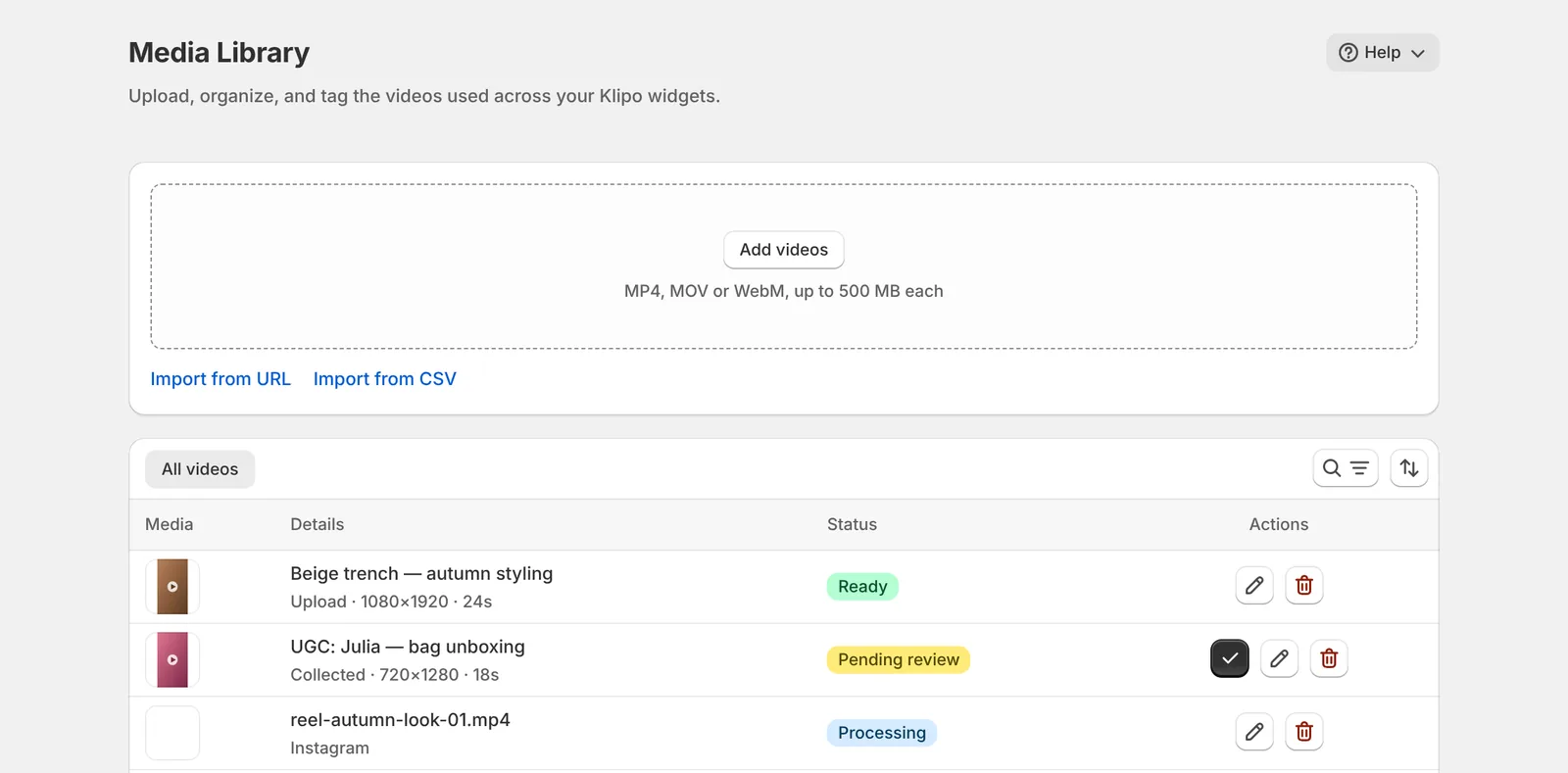
Upload MP4, MOV or WebM files up to 500 MB and 10 minutes, or import from a direct file link or a CSV of up to 500 rows. Every video moves on its own through Queued, Processing and Ready; if something fails you see why and, when it makes sense, a Retry button.
02
Instagram and TikTok, no login
Enter a public profile's handle: Klipo imports the videos already posted and checks the profile once a day, with "Sync now" when you don't want to wait. TikTok photo posts become a video slideshow. No passwords, no OAuth.
03
Videos from your customers
Share a public UGC collection link: customers and creators upload their video, up to 90 MB, with name, email and a rights statement. Submissions land in the Library as "Pending review" and reach your storefront only after you approve them.
04
Eight widget types
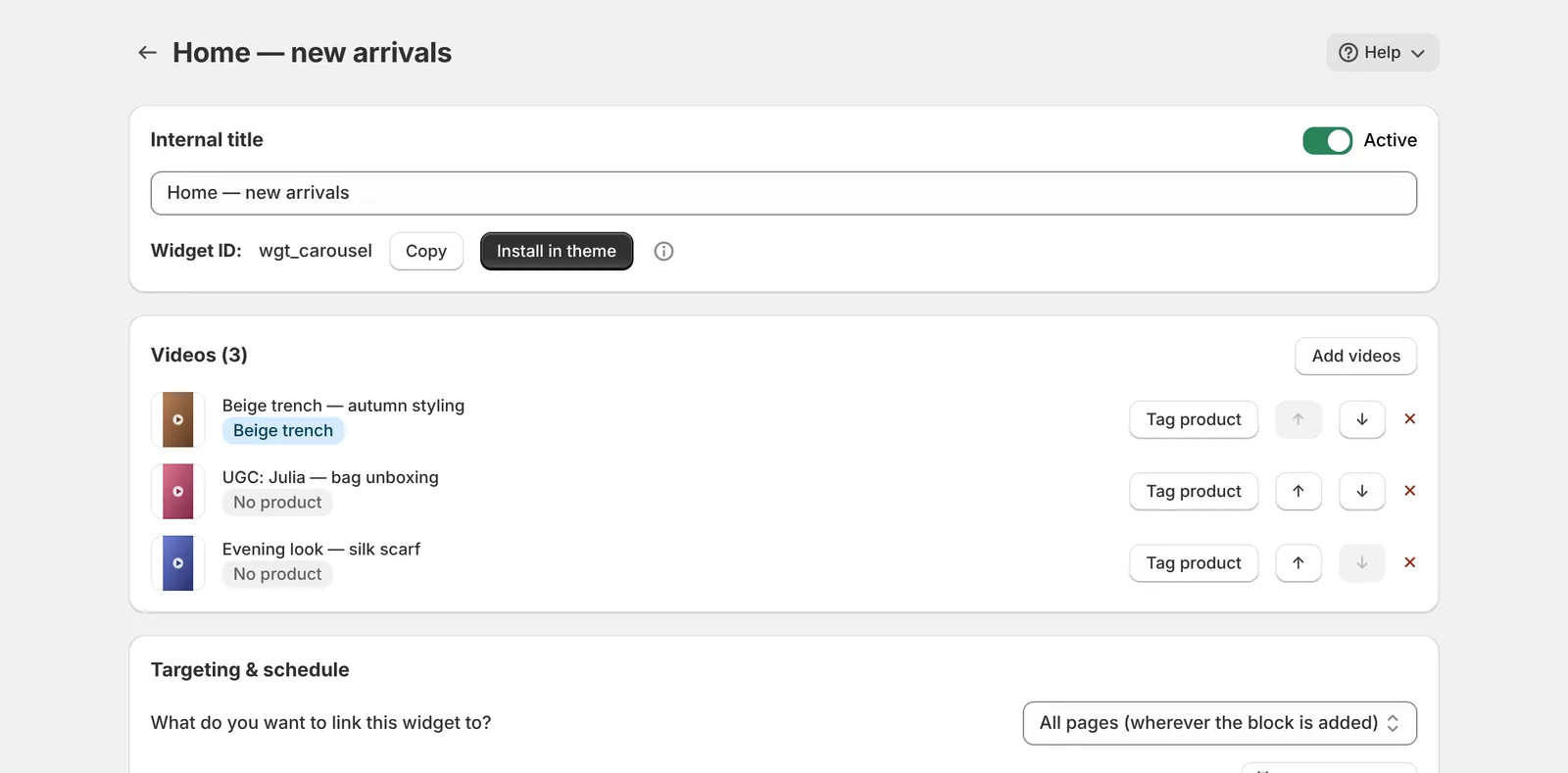
Carousel, Spotlight, Stories, Grid, Hero, Popup, Smart product videos and Collection, with starter templates and a live preview. Targeting limits a widget to all pages or to specific products, collections or URLs; scheduling decides when it is visible.
05
Shop inside the video
A tap on a tile opens a full-screen, Reels-style player: product card with live price and variants, subscriptions when the product offers them, up to four recommended products and add to the store's real cart, without reloading the page.
06
Link-in-bio shop
A public, shoppable page with the videos you pick, at klipo.wavo.it/s/…, ready for your Instagram or TikTok bio. It is fully server-rendered with VideoObject and Product structured data, so search engines can read it too.
07
Analytics and attributed revenue
Impressions, plays, clicks, watched past 50%, product clicks and add-to-carts, plus attributed revenue split into direct, view-through and unattributed. Order value is read from Shopify, never from the browser. Included on every plan.
08
Light on your theme
Klipo ships as a theme app extension, with no edits to your theme files: a single script under 19 KB from Shopify's CDN, the widget isolated in a Shadow DOM and the player in an iframe. "Install in theme" opens the editor with the block already in place.
From first video to first widget in about fifteen minutes
Plus the time it takes to process your videos. On the Overview, the "Complete your setup" checklist walks you through each step.
01
Install
From the Shopify App Store, accepting the permissions. You start on the Free plan and land on the Overview, inside the Shopify admin.
02
Bring in videos
Connect an Instagram or TikTok profile, upload files or import them from URLs and CSV. Processing is automatic.
03
Tag products
On the video page, "Add product" links your catalog: that is the step that makes a video shoppable.
04
Publish the widget
Pick a type and template, switch it on and press "Install in theme": the theme editor opens, you place the block and save.
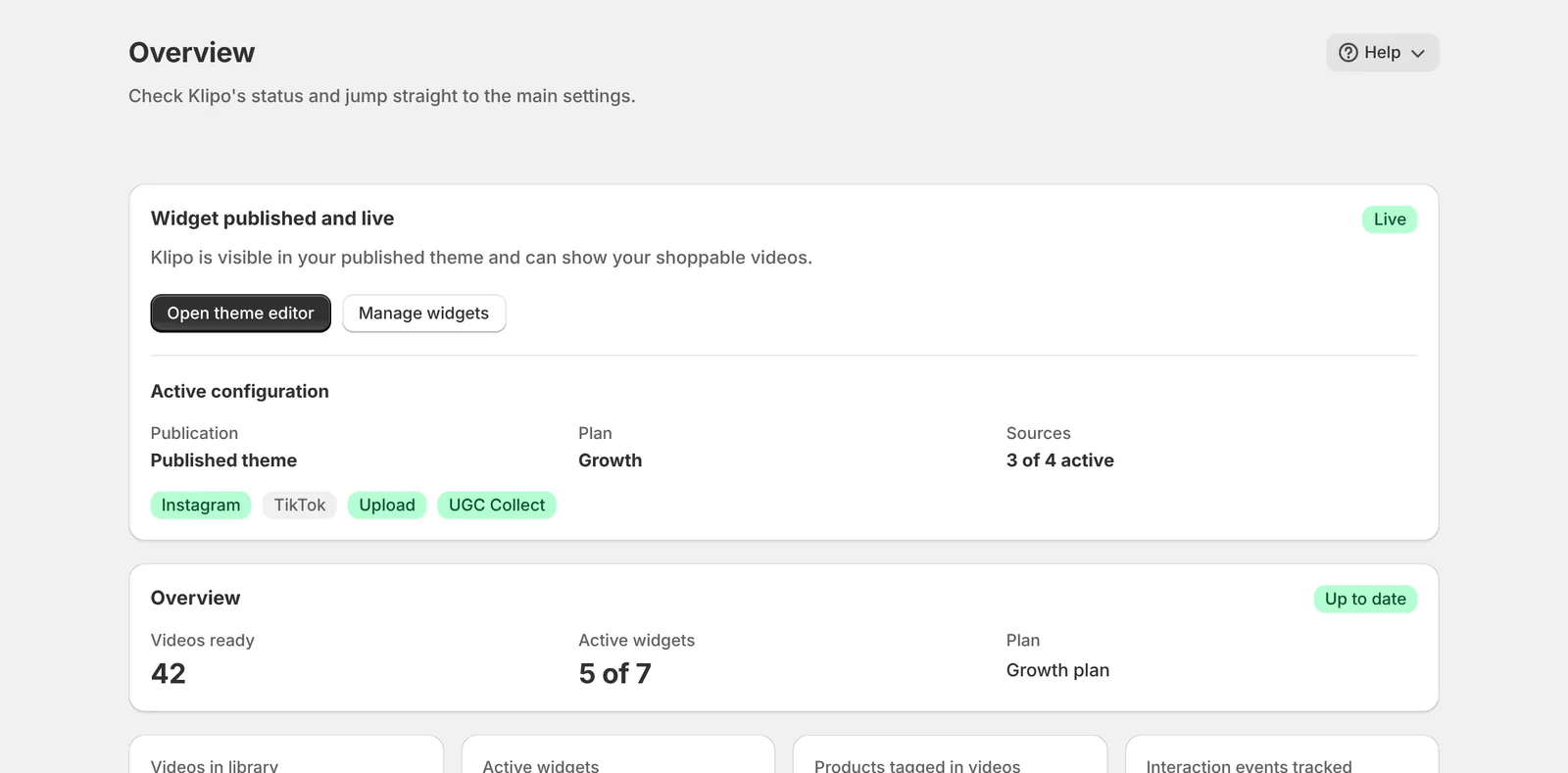
Your store's status on one screen
The Overview tells you whether the widget is published and live in your theme, which plan you are on, which video sources are active and how many videos and widgets you have. All inside the Shopify admin.
Flat pricing. Views are never counted.
You start on the Free plan. The only things counted are videos stored in your library and active widgets: views are unlimited on every plan. Subscriptions are charged by Shopify every 30 days on your regular store invoice, and paid plans come with a 7-day free trial.
Moving to a lower plan deletes nothing: for 30 days Klipo keeps the widget slots you had active.
Free
$0
- 15 videos in your library
- 1 active widget
- Unlimited views
- Analytics and attributed revenue
Starter
$15/30 days
- 100 videos in your library
- 5 active widgets
- Unlimited views
- 7-day free trial
Growth
$45/30 days
- Unlimited videos and widgets
- CSV data export
- Unlimited views
- 7-day free trial
Scale
$179/30 days
- Everything in Growth
- Public API and outgoing webhooks
- Library shared across stores
- 7-day free trial
Prices in US dollars. The amount shown on Shopify's pricing page when you choose a plan is the one that applies.
The answers we give most often
What do I pay if a video gets 100,000 views?
Nothing extra. Views are unlimited on every plan, Free included: you only pay for how many videos you store and how many widgets you keep active.
Can I import a Reel by pasting its link?
No: a link to an Instagram or TikTok page is not a video file. Connect the profile handle from the Accounts page and Klipo imports on its own. "Import from URL" only accepts direct links to .mp4, .mov or .webm files.
Do I need to log in to Instagram or TikTok?
No. All it takes is a public profile's handle and confirming you hold the rights to the content. Private profiles can't be imported; if a profile goes private, syncing pauses.
How long do new posts take to arrive?
The first import starts right away. After that Klipo checks the profile once a day, so a new post can take up to 24 hours. "Sync now" brings it in immediately, at most once a minute.
I created a widget but it doesn't show on my store.
Two things are needed: the widget active in Klipo with at least one ready video, and the Klipo block added and saved in your published theme. "Install in theme" opens the theme editor with the block already added; the Overview tells you when everything is live.
Can I show videos on product or collection pages?
Yes. There are dedicated widget types, Smart product videos and Collection, and the Klipo block can be added to any template. Targeting limits a widget to specific products, collections or URLs.
Do shoppers have to leave the video to buy?
No. From the player they pick a variant and add to your store's cart without reloading the page; checkout stays Shopify's own.
Where does attributed revenue come from?
From your store's real orders: Shopify's Web Pixel reports the checkout and Klipo re-reads the order value from the Admin API instead of trusting the browser. Revenue is split into direct, view-through and unattributed, never mixed.
Does Klipo collect my customers' personal data?
No. Klipo doesn't request the read_customers permission and analytics use a random identifier never linked to a name or email. The one exception is the UGC collection link, where a submitter leaves name and email as a rights record; a redaction request removes them.
What happens if I downgrade or uninstall?
Downgrading switches off and deletes nothing, and for 30 days you keep your active widget slots. After uninstalling, your data stays for about 48 hours until Shopify requests the store's deletion: reinstall before then and everything is still there.
Answered by the people who built it
Importing from Instagram and TikTok, installing the block in your theme, widget targeting, reading analytics, plans and limits. Inside the app, the Help menu on many pages also offers a guided tour and an illustrated guide.
Do not send passwords, API tokens, payment details or customer personal data in support messages.
Live chat
The Wavo chat software loads only after you press the button. Your browser then connects to my.wavo.it.
No data is sent to Wavo until you start the chat.
Write to [email protected]. The address stays available when live chat is offline.
Email [email protected]